















Introduction
Automation tools at a glance
Automation tools save time, prevent manual errors and connect systems that don't talk to each other out of the box. Three solutions dominate many small and mid-sized business stacks: n8n, Zapier and Make. Zapier is known as a no-code SaaS with a huge range of integrations, Make (formerly Integromat) relies on visual scenarios with fine-grained control, and n8n, as an open-source option, offers flexibility and full data ownership when self-hosted. In projects we often hear: "We want to get started fast, but we don't want to walk into a cost trap." That's exactly where the tools differ a lot: in features, pricing model, data privacy, integrations and maintenance. As an integration partner, we give neutral advice and look at concrete use cases, not hype or labels. The sections below will help you make the right choice.
Goal and relevance of this comparison
This comparison focuses on the needs of small and mid-sized businesses that want to automate business-critical processes, from marketing lead flows and internal approvals to syncing ERP, CRM and BI. We evaluate n8n, Zapier and Make against clear criteria: performance, features, cost, data privacy, integrations and maintenance. We base our statements on solid articles and market comparisons, such as lsww.de, AI Rockstars and CoderCampus. The goal: a quick overview instead of weeks of research.
Polina, an e-commerce client, told us recently:
"We want marketing to get started without developers, but our BI team needs API freedom." That's exactly the kind of tension we resolve with a clear decision matrix.
Differences between n8n, Zapier and Make
Architectural differences
Zapier is a pure cloud SaaS focused on simple Zaps and a sprawling app marketplace. Make is also cloud-based, but offers especially visual, modular scenario logic with branches, iterators and detailed error handling. n8n can be self-hosted or used in the cloud and is open source, which makes it a good fit for environments where data or IT security is sensitive. Several comparisons point out that n8n stands out with HTTP requests, code nodes and webhooks for complex integrations, while Zapier keeps the barrier to entry minimal and Make shines with complex data flows (AI Rockstars, lsww.de). For small and mid-sized businesses, that means architecture follows requirements, from no-code to process-level development.
Target audiences
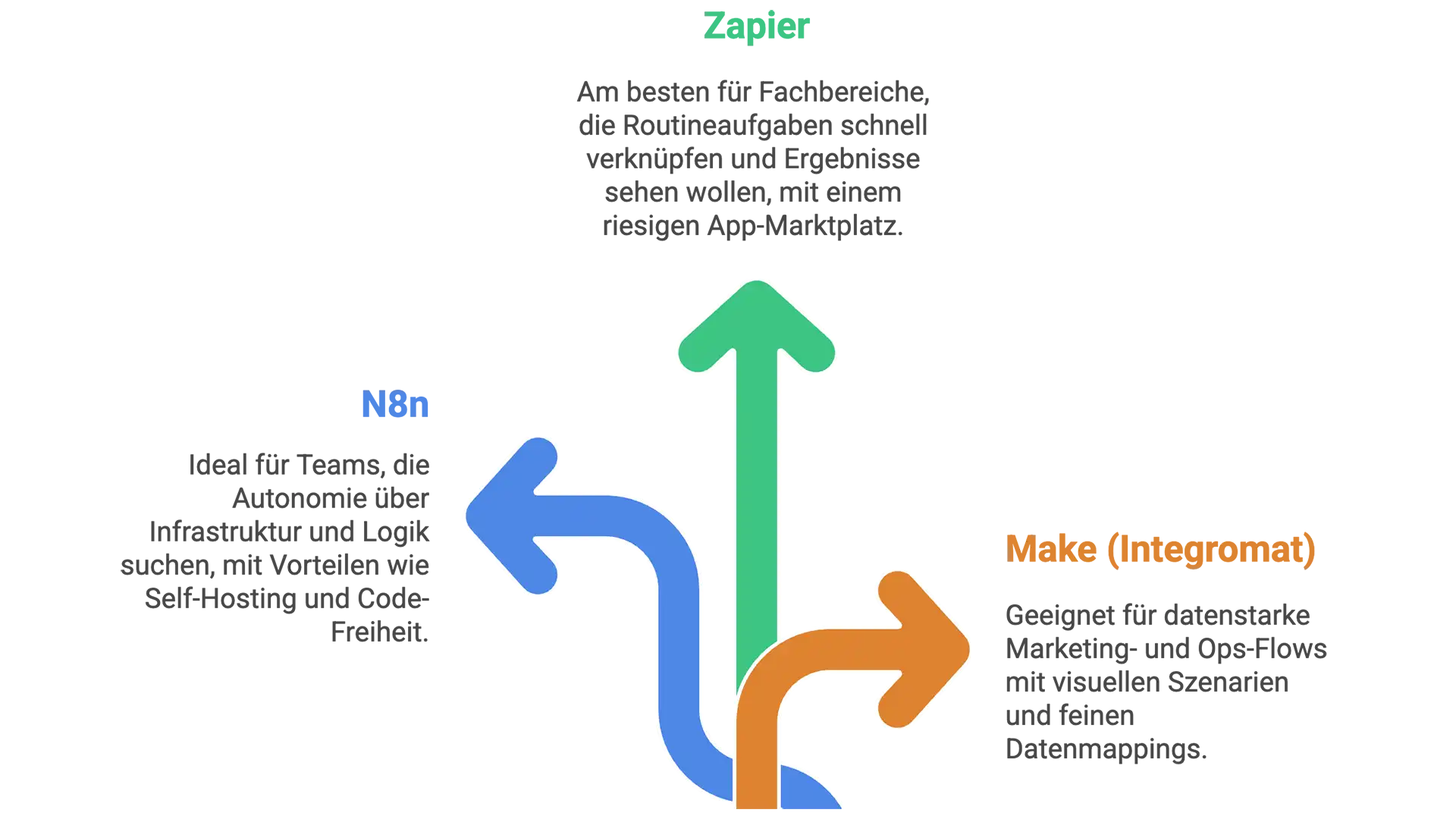
Zapier is aimed mainly at business teams that want to build simple to moderately complex automations without developers. Make targets users who value visual control, parallel paths and data transformations, for example marketing teams with lots of API integrations. Besides tech-savvy teams, n8n appeals to organizations that need self-hosting, data ownership and extensibility. Several overviews agree: for fast MVPs and a wide choice of apps, Zapier is often the first pick; for data-heavy scenarios and branching processes, Make comes out ahead; for custom, extensible setups with an on-prem option, n8n is attractive (CoderCampus, AI Rockstars).
Licensing models and open source
Zapier and Make are proprietary cloud services with subscription models. n8n is open source, can be self-hosted and also comes as a commercial cloud version. That affects not only cost but also data privacy and vendor lock-in. Several sources note that open source makes n8n more customizable and transparent, while Zapier and Make win with ready-made integrations and managed operations (lsww.de, Digital Onzen). For businesses with IT resources, n8n can lower costs and dependencies over the long run; without IT bandwidth, Zapier and Make usually get you productive faster.
Performance and features
n8n: flexibility and customization
n8n excels at complex API flows, custom webhooks and code steps. Many teams use it as a low-code integration platform that can also handle data pipelines. The self-hosting option avoids limits imposed by platform policies and leaves room for your own modules. Sources highlight n8n's strength with AI and agent workflows, because developers can easily connect external models, databases and tools (Digital Onzen, AI Rockstars). The downside: more onboarding and maintenance, especially when self-hosting, and fewer one-click integrations than Zapier.
Zapier: ease of use and integration variety
Zapier has a low barrier to entry: pick an app, set a trigger, define an action, done. The platform covers thousands of apps and is ideal for business teams that want to get going quickly. Comparisons point to its enormous integration catalog and solid reliability for simple and mid-level workflows (lsww.de, CoderCampus). It hits its limits with highly custom logic, bulk processing or sophisticated error handling. As Polina put it: "Zapier was perfect for newsletter and CRM lists. But with our complex product feed, we hit limits fast."
Make: complex automations and visual programming
Make is known for its visual interface, which shows scenarios as module cards with a clear view of the data flow. That makes debugging, transformations and parallel processing easier. Sources point to strong features for iterators, retries, routers and mapping, which is exactly what data-heavy marketing and operations setups need (AI Rockstars, lsww.de). The learning curve is a bit steeper than Zapier's, but scenarios are often more robust for complex requirements. Compared to n8n, it lacks self-hosting and full code freedom, but the managed service saves you maintenance work.
What each tool can do for automated workflows
Small businesses and startups
Small teams need fast results on a limited budget. Zapier is often the easiest place to start: a few clicks, a huge choice of apps, transparent plans. Make pays off when data volumes and transformation logic grow, for example when connecting ads, feeds and analytics. n8n is attractive when a tech-savvy founder or an agency helps with the setup, for instance to keep costs under control through self-hosting or to keep sensitive data in-house (CoderCampus). Our recommendation: start with Zapier or Make and migrate later if flexibility or data ownership become more important.
Mid-sized companies
Mid-sized companies often combine automations owned by business teams with IT-driven integration. Make suits teams that need more demanding logic but want the convenience of a managed service. n8n is strong when data privacy, on-prem strategies or deep API connections are the priority, especially combined with AI workflows and databases (Digital Onzen). Zapier still makes sense for quick departmental projects with lots of standard apps. Governance is key: which workflows are critical and need to be run by IT, and which can stay with the business teams?
Large corporations and enterprise solutions
In large corporations, scalability, security and integration with existing infrastructure are what count. Make can map complex scenarios cleanly, and Zapier shines at self-service integrations for business teams. n8n wins when self-hosting, multi-tenancy or custom policies are mandatory (AI Rockstars). Often a hybrid emerges: n8n for central, sensitive flows and Make or Zapier for fast, decentralized automations. We recommend an internal enablement program so business teams can build safely while IT sets the guardrails.
How n8n, Zapier and Make work in comparison
Interface and usability
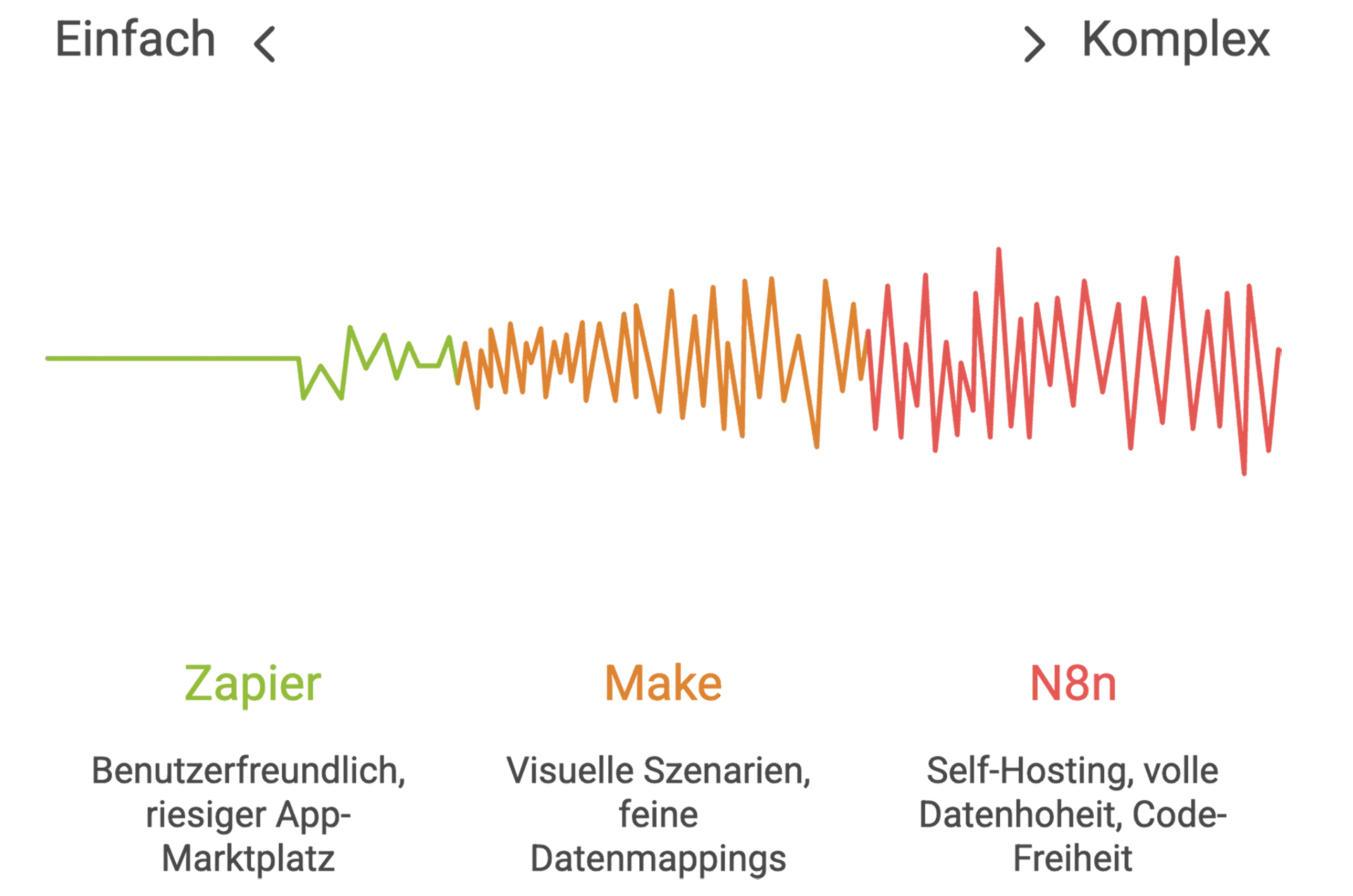
Zapier: clear, linear Zaps with a step-by-step editor, ideal for beginners. Make: a graphical canvas with drag and drop and a visible data flow, which makes debugging very convenient. n8n: node-based workflows in a browser editor, open to code steps and custom nodes. Comparisons agree that Make offers the best visual transparency, Zapier the lowest barrier to entry and n8n the most creative freedom (lsww.de, AI Rockstars). The right choice depends on how much no-code, low-code or code a team actually needs.
Integration options and support
Zapier has the largest app catalog. Make offers numerous modules and detailed data mapping. n8n provides HTTP, webhook and code nodes, so even unusual APIs can be integrated. In practice: Zapier for plug-and-play, Make for complex module chains, n8n for custom integrations and legacy systems. Sources point out that all three tools offer extensive integrations, but with different strengths and depth (CoderCampus, lsww.de).
Community and developer support
As an open-source project, n8n has an active community and plenty of examples of custom extensions. Zapier and Make offer extensive help centers, forums and templates. For AI and agent workflows, sources name n8n as especially well suited, because developers can quickly connect new models and tools (Digital Onzen). Still, if you have few developer resources, Zapier and Make often serve you better with curated templates and support as part of the managed service.
Pros and cons of n8n compared to Zapier and Make
n8n: open-source flexibility and community support
Pros: self-hosting, full data ownership, freedom with code and HTTP, a good fit for AI- and API-heavy flows, an active community. Cons: steeper learning curve, maintenance effort in operation, fewer out-of-the-box integrations than Zapier (AI Rockstars, Digital Onzen). A good match for teams that want control over infrastructure and logic.
Zapier: extensive app integrations and simplicity
Pros: huge app marketplace, very easy to use, fast time to value, lots of templates. Cons: limited depth for complex cases, costs at high volume, less data control than self-hosting (lsww.de). Well suited for business teams that want to connect routine tasks and see results quickly.
Make: visual building and powerful features
Pros: visual scenarios, fine-grained data mapping, branching, good error handling and debugging. Cons: steeper learning curve than Zapier, no self-hosting, and planning costs based on "operations" takes experience (lsww.de, AI Rockstars). Good for data-heavy marketing and ops flows with multiple API sources.
Cost and data privacy
Pricing models and subscriptions
Zapier typically charges per "task", Make per "operation", and n8n allows low-cost self-hosting plus optional cloud plans. Several comparisons warn that costs depend heavily on volume and granularity: plans that look cheap can get expensive with lots of events (CoderCampus, lsww.de). Our advice: project your real event numbers, build in a buffer and compare tiers. n8n often comes out ahead with consistently high volume and in-house IT.
Data privacy and data storage
With Zapier and Make, data is processed in the vendor's cloud; with a self-hosted n8n, you can keep data inside your own network. For industries with strict compliance requirements, that's a strong argument for n8n. Sources emphasize that data privacy and data ownership are core criteria for many companies (AI Rockstars, lsww.de). Whatever the tool, check data processing agreements, deletion policies and logging, as well as where backups and error data end up.
Integrations and extensibility
Interfaces and API compatibility
Zapier: a very large number of native app integrations with little setup effort. Make: a broad module library with strong data processing. n8n: HTTP, webhook and code nodes make almost any API usable, even when there's no ready-made connector. That makes n8n attractive for legacy systems and specialized software, while Zapier and Make are faster with mainstream apps (CoderCampus, lsww.de).
Third-party plugins and extensions
n8n lets you build your own nodes and use community extensions, so the platform can serve as an integration framework. Zapier and Make also have developer programs, but mainly within their cloud platforms. According to comparisons, n8n's open approach leads to high customizability, while Zapier and Make deliver consistency and fewer errors through curated catalogs (AI Rockstars, lsww.de).
Maintenance and support
Community support and documentation
All three tools have active communities and help centers. n8n also benefits from open-source contributions, example workflows and discussions around self-hosted setups. For beginners, Zapier is usually the most accessible, while Make helps with detailed scenario examples and debug views (CoderCampus).
Professional support and OEM solutions
Zapier and Make provide managed operations and commercial support depending on the plan. n8n offers cloud plans and can also run self-hosted with internal or external support. For OEM and white-label scenarios, n8n is often considered because it allows deeper customization and integration (lsww.de, AI Rockstars). Our advice: match the support level to how critical the workflows are and define SLAs. If your workflows depend on website forms or your online store, the website itself needs regular care too. With ongoing website maintenance, updates that break an integration get caught early.
Use cases and recommendations by audience
Freelancers and solopreneurs
For quick wins in sales and marketing, Zapier is usually the practical choice. Make pays off when data mapping and splits come up more often (e.g. feeds, parsers, ad performance tracking). n8n is ideal when the budget is tight but you have the technical know-how, for example to automate back-office processes with self-hosting (lsww.de).
Small and growing businesses
Many small and mid-sized businesses benefit from Make for more demanding cross-tool scenarios and from Zapier for simple departmental flows. n8n fits once data ownership, APIs without a standard connector or AI services become the focus, and when in-house IT or an integration partner handles maintenance (Digital Onzen).
Large corporations with complex requirements
Large corporations often combine all three: n8n for central, sensitive integrations, Make for data flows you can control visually and Zapier for decentralized departmental automations. Governance, monitoring and cost control across teams and projects are essential (AI Rockstars). Our advice: one platform as the core, the others as add-ons.
Comparison table and decision matrix
The overview below sums up the core criteria. Rating: high/medium/low relative to small and mid-sized businesses.
| Criterion | n8n | Zapier | Make |
|---|---|---|---|
| Performance with complex flows | High (code/HTTP, self-hosting) | Medium | High (visual scenarios) |
| Out-of-the-box features | Medium | High | High |
| Cost at high volume | Low (self-hosted), variable (cloud) | Rising (tasks) | Rising (operations) |
| Data privacy/data ownership | High (on-prem possible) | Medium (cloud) | Medium (cloud) |
| Integrations/apps | High (flexible via API) | Very high (app catalog) | High (modules) |
| Maintenance/support | Requires IT (self-hosted) | Low (SaaS) | Low (SaaS) |
Decision matrix by use case:
| Use case | Recommendation | Reason |
|---|---|---|
| Fast marketing automation (leads → CRM → newsletter) | Zapier | Wide app selection, minimal setup |
| Data-heavy flows with splits/iterators | Make | Visual scenarios, strong mapping/debugging |
| Custom API integrations and AI agents | n8n | HTTP/code freedom, self-hosting possible |
| Strict data privacy requirements (on-prem) | n8n | Data ownership and local processing |
| Self-service for business teams without IT | Zapier/Make | SaaS, templates, low maintenance |
Summary and decision flow
Choosing based on your needs
If the focus is on simple connections between common tools and teams want to start right away, Zapier is usually the shortest route to results. Once data flows start branching, iterating and transforming, Make gives you better visibility and control. If data ownership, self-hosting or deeply embedded API and AI scenarios are the priority, n8n plays to its strengths. Either way, calculate costs realistically, simulate volume and look at critical flows separately. Sources like lsww.de and AI Rockstars stress that "the best tool" depends on context, not on the label.
Conclusions and recommendations
Our takeaway for small and mid-sized businesses: start where the hurdles are low and keep your options open. Common scenarios:
- Marketing/sales: Zapier for fast results; Make once the data logic gets more complex.
- Operations/BI: Make for mapping-heavy scenarios; n8n for custom APIs and data ownership.
- IT/product: n8n as an integration framework with a self-hosting option.
The decision flow in short:
- No IT resources, standard apps? → Zapier.
- Complex data flows, need visual debugging? → Make.
- On-prem, AI agents, special APIs or cost control at volume? → n8n.
- Allow a hybrid: mix tools based on how critical each flow is.
Sources: CoderCampus, Digital Onzen.
Frequently asked questions (FAQ)
What are the challenges in choosing the right tool?
The biggest pitfalls are underestimated event volume (which drives cost), missing governance (which leads to sprawl) and unclear data requirements. If you prioritize use cases, simulate volume and settle data privacy questions up front, you avoid costly migrations later. Sources recommend realistic tests with real data (lsww.de).
How important is scalability when choosing an automation tool?
Very important: as traffic grows, tasks and operations add up fast. Make gives you good control over processing steps; Zapier scales easily but can get expensive; n8n scales technically but requires operational know-how (CoderCampus).
Which tools are the most future-proof?
Future-proofing depends on openness and community. n8n stands out with open-source flexibility; Zapier and Make with broad market reach and strong app ecosystems. For AI and agent workflows, n8n is often mentioned favorably because new services can be connected quickly (Digital Onzen).
How do the learning curves of the three tools compare?
Zapier: the gentlest learning curve. Make: medium, visual but detailed. n8n: steeper, with more technical concepts but maximum freedom. Several comparisons agree on this (lsww.de, AI Rockstars).
What data privacy aspects should you consider?
Check where data is processed, whether you need self-hosting, what logs are created and how long data is retained. n8n allows on-prem processing, while Zapier and Make are cloud services. Proper data processing agreements and deletion policies are a must (AI Rockstars).
Trying and testing the tools
Set up a two-week proof of concept: 1-2 core workflows per tool, real data and a clear volume target. Measure stability, processing time, cost and maintenance effort. Use the guidance from lsww.de and CoderCampus as a checklist.
Talk to an expert for tailored advice
We're happy to help with selection, proof of concept and operation, from quick wins in Zapier and Make scenarios to self-hosted n8n. On request, we'll put together a migration and governance roadmap tailored to your compliance needs, budget and team structure (AI Rockstars). We can also look at how automation fits into your digital marketing, for example a lead flow from your form into the CRM or automated email campaigns.
Sources
lsww.de: Zapier vs. Make vs. n8n
Digital Onzen: n8n vs Zapier vs Make - AI workflows
AI Rockstars: automation tools compared
CoderCampus: Zapier vs Make vs n8n
Weitere Insights







Teile diesen Artikel